

Evernote and iPad – A Meeting Planners Dream
OK, do you know what Evernote is? If you do, skip this section; if not, I will give you the REALLY abbreviated version from the Wik:
Evernote is a suite of software and services designed for note taking and archiving. A “note” can be a piece of formatted text, a full webpage or webpage excerpt, a photograph, a voice memo, or a handwritten “ink” note. Notes can also have file attachments. Notes can be sorted into folders, then tagged, annotated, edited, given comments, searched and exported as part of a notebook.
Basically, if you need to know where”it” is, you put it in Evernote, and you tag it.
How you use Evernote
Let’s say that you have Evernote installed on every machine that you own, your laptop, iPhone, iPad, office computer….. now say you have a PDF File that you want to save and have on all of your devices because it is really important and maybe, just maybe, you might need to share it with some people. Without Evernote, this might mean that you email the file to yourself or you use something like Dropbox or Sugarsync, but that is like duck hunting with a nuclear weapon. It is overkill.
If you have Evernote, you would create a note, attach the PDF to the note and then hit sync. The file will now be available on all of your devices. When you needed to share it, you would just click the share button.
Yes, it is that easy.
You can do the same with webpages, pictures, and Word Docs, basically, anything that resides on your computer can be put in Evernote.
The iPad
If you are not sure what the iPad is, I hate to tell you but you might live under a rock or perhaps you have been in coma for a couple of years. You may need to seek medical attention, that is up to you to decide but here is a link to Apple so that you can go check one out after they release you from the hospital.
When the iPad first arrived on the scene, many event and meeting planners thought that it would be the most awesome thing since sliced bread and it would change the way that we work on a fundamental level. Then they realized that it was not going to happen that way. To make the iPad work the way we needed, there were apps to buy, things to do, and changes to make on a subatomic level. It was just not that easy.
And then came Evernote and the angels sang, the heavens opened and everyone was sprinkled with flowers and candy.
The iPad and Evernote
No more binders at your events
Not having a binder is a hard thing for most meeting and event planners to understand because they treat their binders like a security blanket. They hang onto that thing so hard their knuckles turn white and if you try to open or even touch it, they will rip your arm from its socket and beat you with it until you are unconscious.
Then they will kick you just for spite.
Why are they like this? Because the binder contains everything, their entire event life. That big honkin thing contains the BEOs, the contracts, the seating layouts, the AV Specs, the booze order (can’t lose the booze), the staffing list, the attendee list… the entire event. If it gets lost or stolen, they are literally up shit creek with no paddle and no life vest.
Losing it would be disaster but it does not have to be.
What is an event binder if you boil it down to its components. Beyond being a big white thing with clips, all a binder holds is the printouts of crap that you get off of your computer.. nothing more.
Using the iPad and Evernote, you can totally ditch the binder and find your information faster than ever. Yes, even faster than thumbing through those 1-31 tabs ya got there sunshine.
In fact, I will go as far as saying that the iPad and Evernote can make your new “eBinder” 10 times better than your old, tired, bent clip, dirty lookin, Avery Label havin, heavy like a brick, nasty binder.
So how do you make it happen?
You download and install the free Evernote app on every device you might even contemplate using, you then set up notebooks for everything you need.
Notebooks are like folders, they contain everything that you might group together. For example, you might have a notebook for BEOs, one for seating charts, one for attendee lists, etc. When you create the notebook, make sure that “synch” is checked so that they are available across all of your devices.
Now you put in your data. All of that stuff that would normally go in your binder. As you put it in Evernote, make sure to tag liberally because the power of Evernote is in the tags.
When you upload an attendee spreadsheet for example, tag it Attendee, Attendees, Binder, “The Event Name” and a bunch of others. You do this because later when you need it, you can type in any of these terms and find that list.
Once you are comfortable, start uploading all of the shit that you always wished you COULD have in your binder. Things like links and images of every website for every vendor, pictures of all of your staff, pictures of all of your VIPs, Pictures from your site visit, emails from the boss and more and more and more!!!!! Put every last freakin thing you could think of into Evernote and you will never be without it.
Unlike the old traditional binder that gets all full up, Evernote will hold it all.
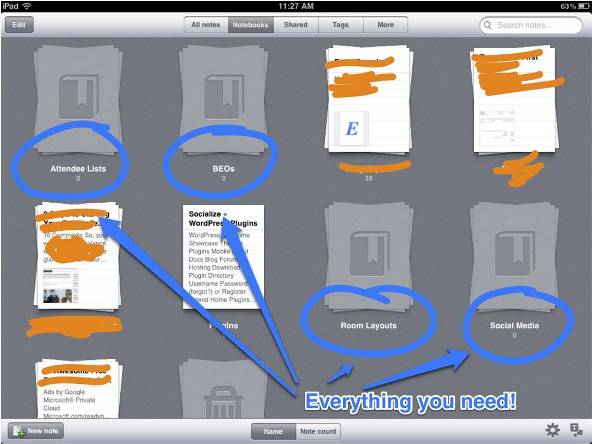
At the Event
Now that you are at the event, you walk into a ballroom and they have the whole thing set wrong but those ass-hats are arguing with you. All you have to do is open up Evernote, search “Seating” “Ballroom” and BAM, you can set them straight in under 10 seconds.
Here is a look at a PDF of the annual Site Auction venue in Evernote:
First, I grabbed my iPad and typed Layout:

Then, I opened the Layout (I cropped the picture to fit in this post):
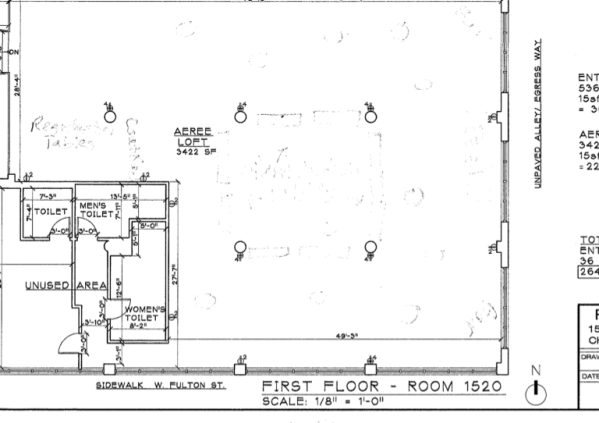
That is it, all done.
A Bonus Feature
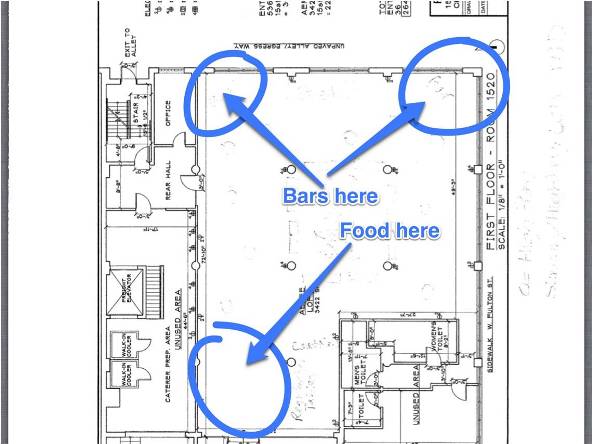
There is also an app called Skitch, this app is from the Evernote folks, and it allows you to draw on screenshots and photos (on your iPad) and send them to Evernote. So, say I wanted to make a change to the above layout, I could snap a screenshot, open Skitch, make an edit and email it to the banquet department in about 30 seconds (YES – 30 SECONDS!).
Even More Uses For Evernote
You can also use it on the fly. Say you are talking to someone with a great idea, you can snap a picture and add a note to remember them or you can take a picture of the bus that is taking attendees on an excursion or you can take photos and share them with your social media team, the possibilities are endless.
Additional Uses and Tips
Here are some uses that many people don’t think about
- Use Evernote to organize your receipts at the event (take an image or scan and tag it). Evernote syncs with some of the programs in my post about accounting programs for meeting planners.
- Store instant message conversations
- See an idea for your next event? Snap a picture
- Stack your notebooks. Just like folders in Windows, you can stack like notebooks and have them all together under one term (the name of the event maybe).
- Find an online video of a great speaker, clip the page, and send it to your client or committee.
- Take handwritten notes in your precon? Scan them or take a picture and add them to the BEO section.
- For faster syncing, make sure all your folders are “sync with Evernote”.
- Search with Google. If you use Google Chrome, you can opt to search the web and Evernote as well.
What is the Drawback
The BIGGEST problem with Evernote is that people don’t use it. I FELL INTO THIS CATEGORY. I installed it when it first came out and then it sat unused until I made the effort to make it work and now I cannot live without it. That is the only bad thing about it, you simply keep reverting to the old way of doing business because it is comfortable.
Now, Evernote is my binder, my notes, my bookmarking tool, where I store my draft posts, and where I keep my ideas. It is quickly becoming indispensable to me.
You won’t regret making the switch once you realize that you don’t need that awful heavy thing anymore.
If you have ever wanted to ditch the binder in favor of a tech solution that WORKS, this is it. This is the time, and these are the two things that you need to make it happen. No more excuses, no more waiting, just get out there and do it.
